Co-op matchmaking preferences don't seem to work.
Official FAQ - MODES & STRATEGY
Why doesn't Co-op matchmaking follow my preferences?
Co-op matchmaking settings are preferences. If the system can't find a player who meets your settings, it widens the search to avoid a long wait. For example, if you set your preferred minimum to Wave 80, you may still match with someone who hasn't reached it.
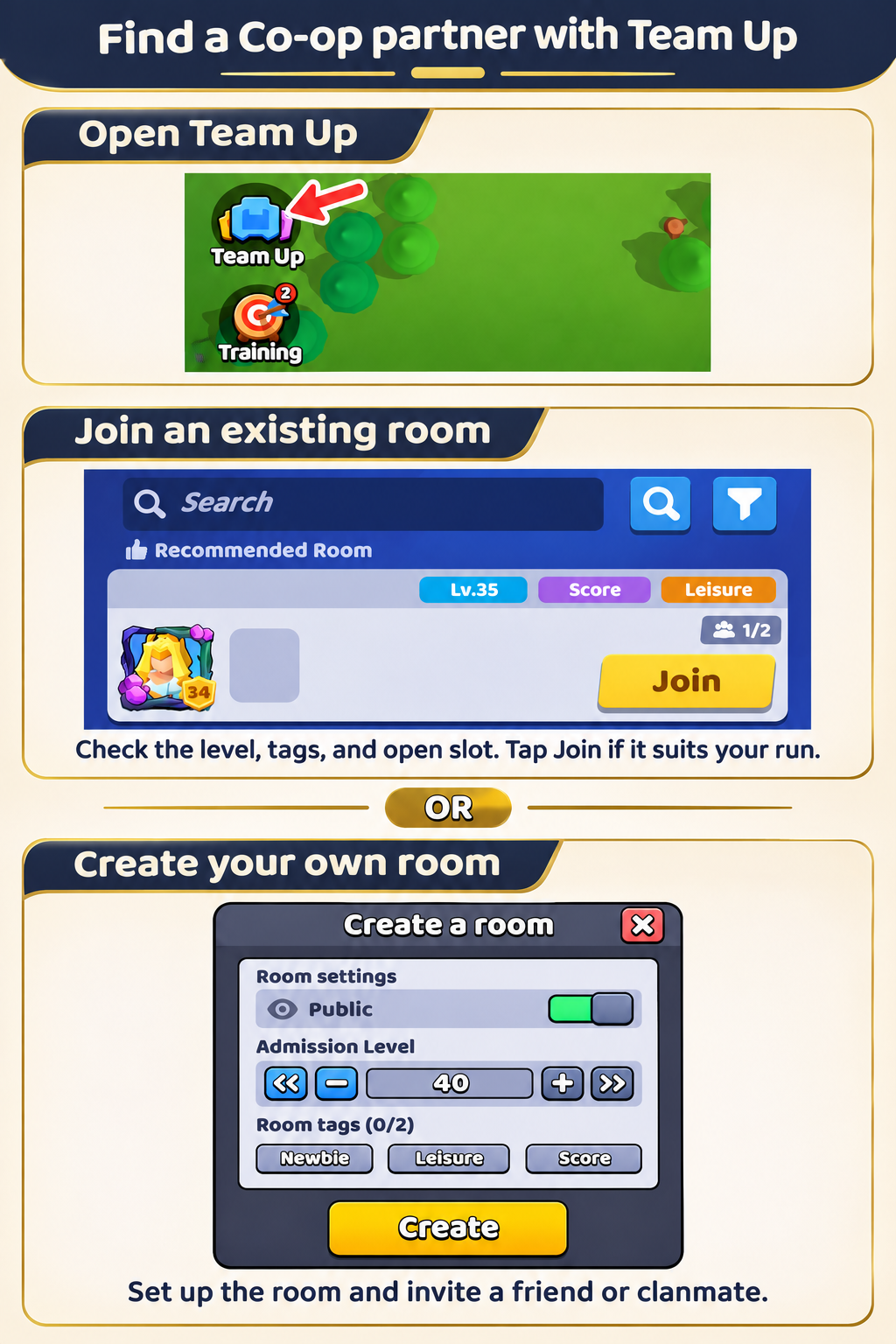
Find a Co-op partner with Team Up
On the Home screen, tap Team Up near the bottom left to open the Co-op Room Lobby. From there, you can join an existing room or create your own.
- Join an existing room. Browse the available rooms or use Search and the filter button. If you find an open room that suits your run, tap Join.
- Create your own room. If you want to choose your partner or don't see a suitable room, tap Create. Set the Admission Level, choose whether to make the room Public, and optionally add up to two room tags. Tap Create again. You can invite a friend or clanmate directly and decide who to start the match with.
For higher-wave runs, Team Up can be faster and more convenient. Players who regularly reach higher waves often arrange their runs in advance, so you're less likely to find them through random matchmaking.
View Team Up Guide