Fusion
Fusion Guide
Fusion Guide
◆ What Is Fusion?
Fusion allows you to combine three troops to obtain one new troop.
The resulting troop's rarity depends on the rarity of the three troops used. When multiple outcomes are possible, the result follows the probabilities shown below.
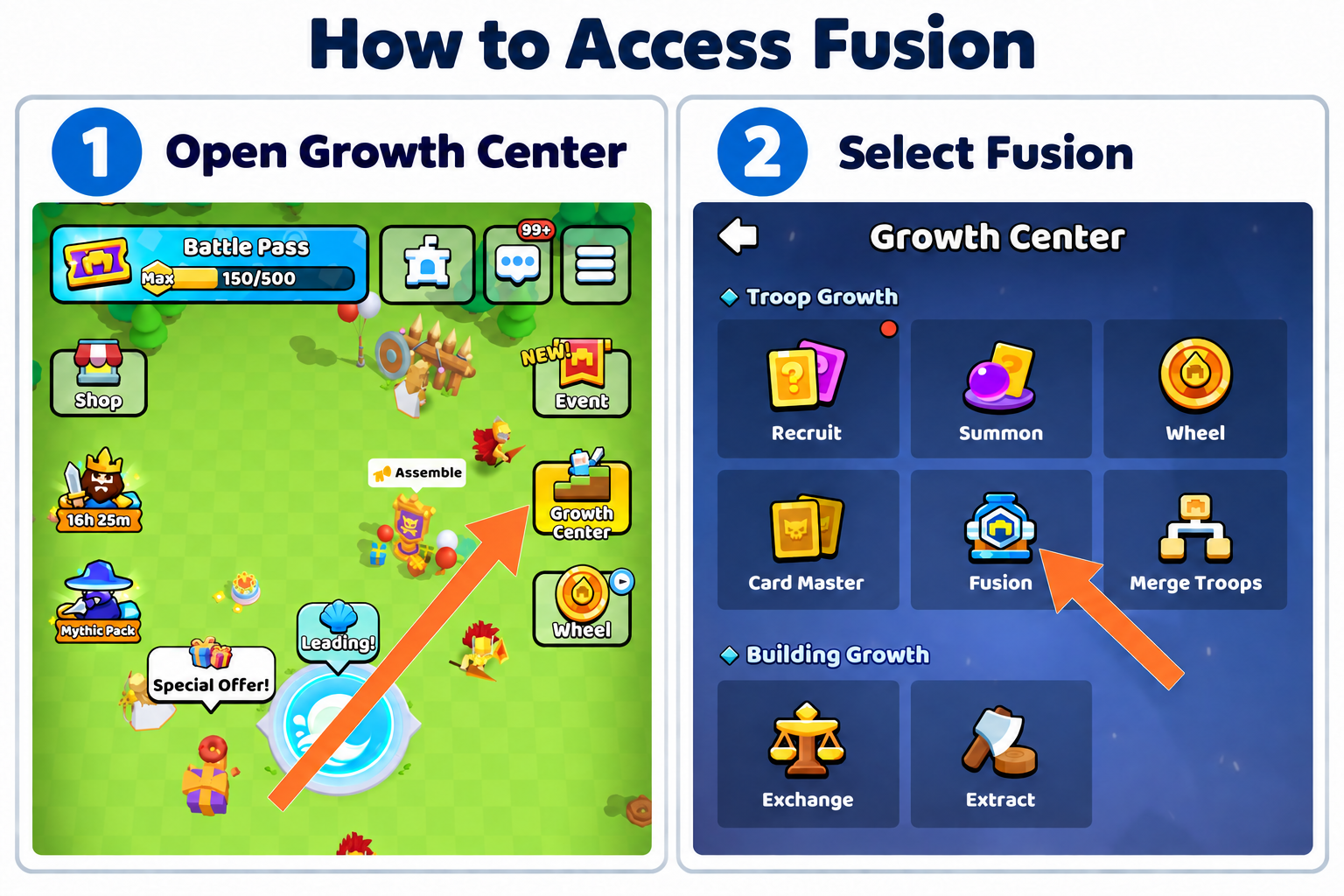
◆ How to Access Fusion
- Open the Growth Center from the Home screen.
- Find the Troop Growth section.
- Select Fusion.
Visual Guide: How to Access Fusion
◆ Fusion Results
| Troops Used | Possible Result |
|---|---|
| 3 Common troops | 1 Rare troop |
| 3 Rare troops | 1 Epic troop |
| 3 Epic troops | 1 Legendary troop |
| 1 Legendary + 2 Epic troops | 1/3 Mythical or 2/3 Legendary |
| 2 Legendary + 1 Epic troop | 2/3 Mythical or 1/3 Legendary |
| 3 Legendary troops | 1 Mythical troop |
Note: Common troops may be called Normal troops on the in-game Fusion Rules screen.
◆ How the Result Is Selected
The new troop is randomly selected from the available troops of the resulting rarity. Every eligible troop within that rarity has an equal chance of being selected.
Troops that are still locked cannot be obtained through Fusion. They must first be unlocked through another available method.
◆ Check the Preview Before Fusing
Open the Preview tab on the Fusion screen to see which troops can currently be obtained from each rarity.
The Preview screen should always be checked before confirming a Fusion, as the available troop pools may change when the game is updated.
◆ Available Troops Shown in Preview
Mythical
- Gryphon Knight
- Geomancer
- Storm Maiden
- Starlight Apostle
- Fury Cannoneer
- Flame Duelist
- The Knight King
Legendary
- Sakura Ronin
- Ghost Assassin
- Ursa Champion
- Wind Apostle
- Ashen Arcanist
- Hydromancer
- Iron Bulwark
- Bone Gunner
- Blast Dwarf
- Windlord
- Elven Archer
- Great Axe Warrior
Epic
- Rock Thrower
- Poison Master
- Snowman Warrior
- Flame Mage
- Oracle
- Bone Warlock
- Pumpkin Guard
- Wooden Wizard
- Royal Archer
Rare
- Berserker
- Goblin Warrior
- Forest Scout
- Flail Warden
- Apprentice Mage
- Frost Skeleton
- Bomber
- Gale Wolf
- Paladin
- Goblin Chef
- Goblin Shaman
Common
- Archer
- Gunner
- Demoman
- Snowball Thrower
- Swordsman
- Woodshield Guard
◆ Fusion Cost
Fusion requires Gold. The required amount is displayed on the Fuse button before you confirm.
Always review the selected troops, possible result, and Gold cost before completing the Fusion.
Important
The three selected troops are consumed when Fusion is completed. Review your selected troops, possible result, and Gold cost before confirming.